Canvas bezierCurveTo() Method
Example
Draw a cubic Bézier curve:
JavaScript:
const canvas = document.getElementById("myCanvas");
const ctx = canvas.getContext("2d");
ctx.beginPath();
ctx.moveTo(20, 20);
ctx.bezierCurveTo(20, 100, 200, 100, 200, 20);
ctx.stroke();
Try it Yourself »
Description
The bezierCurveTo() method adds a curve to the path by using the
control points that represent a cubic Bézier curve.
Use the stroke() or fill() method to draw the path.
A cubic bezier curve requires three points. The first two points are control points that are used in the cubic Bézier calculation and the last point is the ending point for the curve. The starting point for the curve is the last point in the current path. If a path does not exist, use the beginPath() and moveTo() methods to define a starting point.
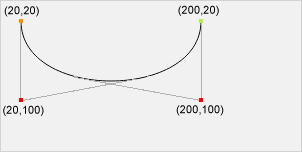 Start point: moveTo(20, 20)
Control point 1: bezierCurveTo(20, 100, 200, 100, 200, 20)
Control point 2: bezierCurveTo(20, 100, 200, 100, 200, 20)
End point: bezierCurveTo(20, 100, 200, 100, 200, 20)
Start point: moveTo(20, 20)
Control point 1: bezierCurveTo(20, 100, 200, 100, 200, 20)
Control point 2: bezierCurveTo(20, 100, 200, 100, 200, 20)
End point: bezierCurveTo(20, 100, 200, 100, 200, 20)
Note
The quadraticCurveTo() Method has one control point instead of two.
See Also:
The beginPath() Method (Start a new path)
The closePath() Method (Close current path)
The moveTo() Method (Move the path to a point)
The lineTo() Method (Add a line to the path)
The fill() Method (Fill current path)
The stroke() Method (Draw current path)
The arc() Method (Add a circle to the path)
The arcTo() Method (Add a circle to the path)
The quadraticCurveTo() Method (Add a curve to the path)
Syntax
| context.bezierCurveTo(cp1x, cp1y, cp2x, cp2y, x, y) |
Parameter Values
| Param | Description | Play it |
|---|---|---|
| cp1x | The x-coordinate of the first Bézier control point | Play it » |
| cp1y | The y-coordinate of the first Bézier control point | Play it » |
| cp2x | The x-coordinate of the second Bézier control point | Play it » |
| cp2y | The y-coordinate of the second Bézier control point | Play it » |
| x | The x-coordinate of the ending point | Play it » |
| y | The y-coordinate of the ending point | Play it » |
Return Value
| NONE |
Browser Support
The <canvas> element is an HTML5 standard (2014).
bezierCurveTo() is supported in all modern browsers:
| Chrome | Edge | Firefox | Safari | Opera | IE |
| Yes | Yes | Yes | Yes | Yes | 9-11 |

