Canvas drawImage() Method
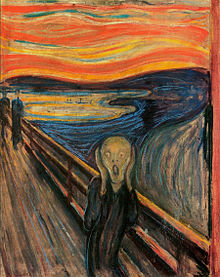
Image to use:
Example
Draw the image onto the canvas:
JavaScript:
const canvas = document.getElementById("myCanvas");
const ctx = canvas.getContext("2d");
const img = document.getElementById("scream");
ctx.drawImage(img, 10, 10);
Try it Yourself »
Description
The drawImage() method draws an image, canvas, or video onto the canvas.
The drawImage() method can also draw parts of an image, and/or increase/reduce the image size.
Syntax
Position the image on the canvas:
| context.drawImage(img, x, y) |
Position the image on the canvas, and specify width and height of the image:
| context.drawImage(img, x, y, width, height) |
Clip the image and position the clipped part on the canvas:
| context.drawImage(img, sx, sy, swidth, sheight, x, y, width, height) |
Parameter Values
| Param | Description | Play it |
|---|---|---|
| img | Specifies the image, canvas, or video element to use | |
| sx | Optional. The x coordinate where to start clipping | Play it » |
| sy | Optional. The y coordinate where to start clipping | Play it » |
| swidth | Optional. The width of the clipped image | Play it » |
| sheight | Optional. The height of the clipped image | Play it » |
| x | The x coordinate where to place the image on the canvas | Play it » |
| y | The y coordinate where to place the image on the canvas | Play it » |
| width | Optional. The width of the image to use (stretch or reduce the image) | Play it » |
| height | Optional. The height of the image to use (stretch or reduce the image) | Play it » |
Return Value
| NONE |
More Examples
Example
Position the image on the canvas, and specify width and height of the image:
JavaScript:
const canvas = document.getElementById("myCanvas");
const ctx = canvas.getContext("2d");
const img = document.getElementById("scream");
ctx.drawImage(img, 10, 10, 150, 180);
Try it Yourself »
Example
Clip the image and position the clipped part on the canvas:
JavaScript:
const canvas = document.getElementById("myCanvas");
const ctx = canvas.getContext("2d");
const img = document.getElementById("scream");
ctx.drawImage(img, 90, 130, 50, 60, 10, 10, 50, 60);
Try it Yourself »
Example
Video to use (press Play to start the demonstration):
Canvas:
JavaScript (the code draws the current frame of the video every 20 millisecond):
const video = document.getElementById("video1");
const canvas = document.getElementById("myCanvas");
ctx = canvas.getContext('2d');
v.addEventListener('play', function() {var i = window.setInterval(function()
{ctx.drawImage(v, 5, 5, 260, 125)}, 20);}, false);
video.addEventListener('pause', function() {window.clearInterval(i);}, false);
video.addEventListener('ended', function() {clearInterval(i);}, false);
Try it Yourself »
Browser Support
The <canvas> element is an HTML5 standard (2014).
drawImage() is supported in all modern browsers:
| Chrome | Edge | Firefox | Safari | Opera | IE |
| Yes | Yes | Yes | Yes | Yes | 9-11 |
❮ Canvas Reference

