Canvas textBaseline Property
Example
Draw a red line at y=100, then place each word at y=100 with different textBaseline values:
JavaScript:
const canvas = document.getElementById("myCanvas");
const ctx = canvas.getContext("2d");
//Draw a red line at y=100
ctx.strokeStyle = "red";
ctx.moveTo(5, 100);
ctx.lineTo(395, 100);
ctx.stroke();
ctx.font = "20px Arial"
//Place each word at y=100 with different textBaseline values
ctx.textBaseline = "top";
ctx.fillText("Top", 5, 100);
ctx.textBaseline = "bottom";
ctx.fillText("Bottom", 50, 100);
ctx.textBaseline = "middle";
ctx.fillText("Middle", 120, 100);
ctx.textBaseline = "alphabetic";
ctx.fillText("Alphabetic", 190, 100);
ctx.textBaseline = "hanging";
ctx.fillText("Hanging", 290, 100);
Try it Yourself »
Description
The textBaseline property sets or returns the text baseline used when drawing text.
Default value is alphabetic
Se the illustration below for the baselines supported by textBaseline:
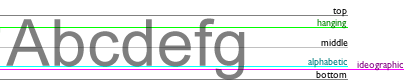
See Also:
The font Property (Set text font and size)
The fillStyle Property (Set text color/gradient)
The textAlign Property (Set text alignment)
The fillText() Method (Draw the text)
The strokeText() Method (Draw the text)
Note
Both fillText() and strokeText() will use the textBaseline value when drawing text.
Syntax
| context.textBaseline = "alphabetic|top|hanging|middle|ideographic|bottom" |
Property Values
| Values | Description | Play it |
|---|---|---|
| alphabetic | The normal alphabetic baseline | Play it » |
| top | The top of the em square | Play it » |
| hanging | The hanging baseline | Play it » |
| middle | The middle of the em square | Play it » |
| ideographic | The ideographic baseline | Play it » |
| bottom | The bottom of the bounding box | Play it » |
Browser Support
The <canvas> element is an HTML5 standard (2014).
textBaseLine is supported in all modern browsers:
| Chrome | Edge | Firefox | Safari | Opera | IE |
| Yes | Yes | Yes | Yes | Yes | 9-11 |
❮ Canvas Reference
