CSS Syntax
Examples
Syntax
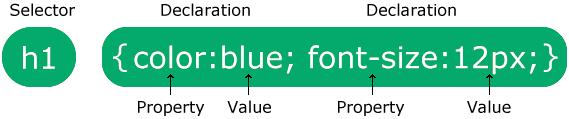
The CSS syntax is made up of three parts: a selector, a property and a value:
| selector {property:value} |
The selector is normally the HTML element/tag you wish to define, the property is the
attribute you wish to change, and each property can take a value.
The property and value
are separated by a colon, and surrounded by curly braces:
Note: If the value is multiple words, put quotes around the value:
| p {font-family:"sans serif"} |
Note: If you want to specify more than one property for one selector, you must separate each
property with a semicolon.
The example below shows how to define a center aligned paragraph, with a red text color:
| p {color:red;text-align:center} |
To make the style definitions more readable, you can describe one property on each line, like this:
The id and class Selectors
In addition to setting a style for a HTML element, CSS allows you to specify
your own selectors called "id" and "class".
The id Selector
The id selector is used to specify a style for a single, unique element.
The id selector uses the id attribute of the HTML element, and is defined
with a "#".
The style rule below will be applied to the element with id="para1":
Do NOT start an ID name with a number! It will not work in Mozilla/Firefox.
The class Selector
The class selector is used to specify a style for a group of elements. Unlike the id
selector, the class selector is most often used on several elements.
This allows you to set a particular style for any HTML elements with the same class.
The class selector uses the HTML class
attribute, and is defined with a "."
In the example
below, all HTML elements with class="center" will be center-aligned:
You can also specify that only specific HTML elements should be affected by a
class.
In the example
below, all p elements with class="center" will be center-aligned:
Do NOT start a class name with a number!
This is only supported in Internet Explorer.
CSS Comments
Comments are used to explain your code, and may help you when you edit the source code at a later date.
Comments are ignored by
browsers.
A CSS comment begins with "/*", and ends with "*/", like this:
/*This is a comment*/
p
{
text-align:center;
/*This is another comment*/
color:black;
font-family:arial
} |
Make your web applications look like a million bucks
|
|
Most web applications today use boring methods to present data to their viewers using grids or simple HTML tables. FusionCharts induces "life" into the web applications by converting monotonous data into lively charts, gauges & maps.
FusionCharts works with all technologies like ASP, ASP.NET, PHP, ColdFusion, Ruby on Rails, JSP, HTML pages etc.
and connects to any database to render animated & interactive charts. It takes less than 15 minutes and no expertise
whatsoever to build your first chart and just a glance of it to captivate your audience. This fact is endorsed by our
12,000 customers and 150,000 users which include a majority of the Fortune 500 companies.
And yeah, your applications could look like a million bucks by spending just $69.
So go ahead, download your
copy of FusionCharts and start "wow-ing" your customers now!
|
 |
W3Schools' Online Certification Program
The perfect solution for professionals who need to balance work, family, and career building.
More than 4000 certificates already issued!
|
The HTML Certificate documents your knowledge of HTML, XHTML, and CSS.
The JavaScript Certificate documents your knowledge of JavaScript and HTML DOM.
The XML Certificate documents your knowledge of XML, XML DOM and XSLT.
The ASP Certificate documents your knowledge of ASP, SQL, and ADO.
The PHP Certificate documents your knowledge of PHP and SQL (MySQL).
|