PHP Example - AJAX RSS Reader
An RSS Reader is used to read RSS Feeds.
AJAX RSS Reader
In this example we will demonstrate an RSS reader, where the content
from the RSS is loaded into a webpage without refreshing.
Example Explained - The HTML page
The HTML page contains a link to an external JavaScript, an HTML form, and a div element:
<html>
<head>
<script type="text/javascript" src="getrss.js"></script>
</head>
<body>
<form>
Select an RSS-feed:
<select onchange="showRSS(this.value)">
<option value="Google">Google News</option>
<option value="MSNBC">MSNBC News</option>
</select>
</form>
<p><div id="rssOutput">
<b>RSS-feed will be listed here...</b></div></p>
</body>
</html>
|
The HTML form works like this:
- An event is triggered when a user selects an option in the
drop-down box
- When the event is triggered, the function showRSS() is executed
- The <div id="rssOutput"> is a placeholder for
the data returned from the showRSS() function
Example Explained - The JavaScript code
This is the JavaScript code stored in the file "getrss.js":
var xmlhttp;
function showRSS(str)
{
xmlhttp=GetXmlHttpObject();
if (xmlhttp==null)
{
alert ("Your browser does not support XML HTTP Request");
return;
}
var url="getrss.php";
url=url+"?q="+str;
url=url+"&sid="+Math.random();
xmlhttp.onreadystatechange=stateChanged;
xmlhttp.open("GET",url,true);
xmlhttp.send(null);
}
function stateChanged()
{
if (xmlhttp.readyState==4)
{
document.getElementById("rssOutput").innerHTML=xmlhttp.responseText;
}
}
function GetXmlHttpObject()
{
if (window.XMLHttpRequest)
{
// code for IE7+, Firefox, Chrome, Opera, Safari
return new XMLHttpRequest();
}
if (window.ActiveXObject)
{
// code for IE6, IE5
return new ActiveXObject("Microsoft.XMLHTTP");
}
return null;
}
|
The stateChanged() and GetXmlHttpObject functions are the same as in the
PHP AJAX Suggest chapter.
The showRSS() Function
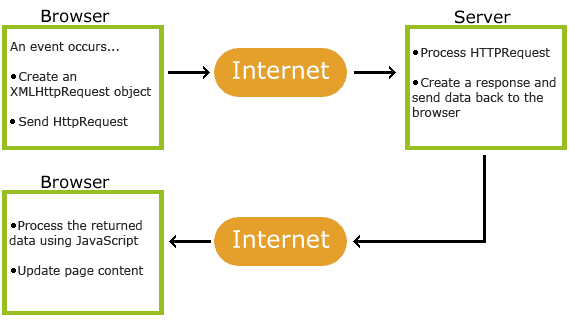
Every time an option is selected in the input field, this function executes
the following:
- Calls the GetXmlHttpObject() function to create an XMLHTTP object
- Defines the URL (filename) to send to the server
- Adds a parameter (q) to the URL with the selected option from the drop-down
list
- Adds a random number to prevent the server from using a cached file
- Each time the readyState property changes, the stateChanged() function
will be executed
- Opens the XMLHTTP object with the given URL
- Sends an HTTP request to the server
Example Explained - The PHP page
The PHP page called by the JavaScript code is called "getrss.php":
<?php
//get the q parameter from URL
$q=$_GET["q"];
//find out which feed was selected
if($q=="Google")
{
$xml=("http://news.google.com/news?ned=us&topic=h&output=rss");
}
elseif($q=="MSNBC")
{
$xml=("http://rss.msnbc.msn.com/id/3032091/device/rss/rss.xml");
}
$xmlDoc = new DOMDocument();
$xmlDoc->load($xml);
//get elements from "<channel>"
$channel=$xmlDoc->getElementsByTagName('channel')->item(0);
$channel_title = $channel->getElementsByTagName('title')
->item(0)->childNodes->item(0)->nodeValue;
$channel_link = $channel->getElementsByTagName('link')
->item(0)->childNodes->item(0)->nodeValue;
$channel_desc = $channel->getElementsByTagName('description')
->item(0)->childNodes->item(0)->nodeValue;
//output elements from "<channel>"
echo("<p><a href='" . $channel_link
. "'>" . $channel_title . "</a>");
echo("<br />");
echo($channel_desc . "</p>");
//get and output "<item>" elements
$x=$xmlDoc->getElementsByTagName('item');
for ($i=0; $i<=2; $i++)
{
$item_title=$x->item($i)->getElementsByTagName('title')
->item(0)->childNodes->item(0)->nodeValue;
$item_link=$x->item($i)->getElementsByTagName('link')
->item(0)->childNodes->item(0)->nodeValue;
$item_desc=$x->item($i)->getElementsByTagName('description')
->item(0)->childNodes->item(0)->nodeValue;
echo ("<p><a href='" . $item_link
. "'>" . $item_title . "</a>");
echo ("<br />");
echo ($item_desc . "</p>");
}
?>
|
When an option is sent from the JavaScript, the following
happens:
- PHP finds out which RSS feed was selected
- An XML DOM object is created for the selected RSS feed
- The elements from the RSS channel are found and outputted
- Loops through the first three elements and output result
 |
W3Schools' Online Certification Program
The perfect solution for professionals who need to balance work, family, and career building.
More than 4000 certificates already issued!
|
The HTML Certificate documents your knowledge of HTML, XHTML, and CSS.
The JavaScript Certificate documents your knowledge of JavaScript and HTML DOM.
The XML Certificate documents your knowledge of XML, XML DOM and XSLT.
The ASP Certificate documents your knowledge of ASP, SQL, and ADO.
The PHP Certificate documents your knowledge of PHP and SQL (MySQL).
|